Why a home inventory is worth the effort
A home inventory is an organised record of your valuable and important possessions, together with the details that are hard to recall later: purchase date, value, serial number and a photo. It sounds like paperwork right up until the moment you need it.
Four situations where such a list genuinely saves time and money:
- Damage and an insurance claim. After a flood or a burglary you have to list what was destroyed or stolen. Working from memory alone, most people recall 60–70% of their belongings and remember the rest after the claim has closed.
- Returns and warranty claims. The purchase date and proof of purchase are needed exactly when a device stops working — the worst possible moment to start hunting for a receipt.
- Moving house. A list lets you check that everything arrived and put a value on the contents for transit cover.
- Selling or giving things away. Knowing what you actually own cuts down on buying duplicates and makes decluttering decisions easier.
One principle matters more than the rest: build the inventory gradually. Trying to describe an entire flat in a single afternoon usually ends with the list abandoned somewhere in the middle of the kitchen.
The 80/20 rule: where to start
The overwhelming majority of a home's value sits in a dozen or so items, maybe a few dozen. Those are the ones that decide whether the list is any use. The rest — cutlery, books, everyday clothes — can wait, or never make the list at all.
First session: the 15 most valuable things
Sit down and write out, from memory, the items that would cost the most to replace. Typically that means the television, laptop, the household's phones, washing machine, fridge, dishwasher, oven, coffee machine, games console, camera and lenses, power tools, bicycle, sports gear, jewellery and watches.
Fifteen entries takes roughly 30–40 minutes including photos. That is a realistic goal for one sitting, and it is already enough for the list to be worth something if you ever have to make a claim.
Second session: things that are hard to replace
The second group covers possessions whose value is not obvious but whose replacement is a nuisance: documents, spare keys and where they are kept, specialist equipment, spare parts, seasonal items stored in the cellar, garage equipment.
What to leave out
There is no point cataloguing things that are cheap, replaceable and bought regularly. Everyday clothes, crockery, toiletries, groceries and small accessories only inflate the list and make it something you stop maintaining. The exception is anything expensive within its own category — a ski jacket or a good set of pans can be worth more than several pieces of electronics.
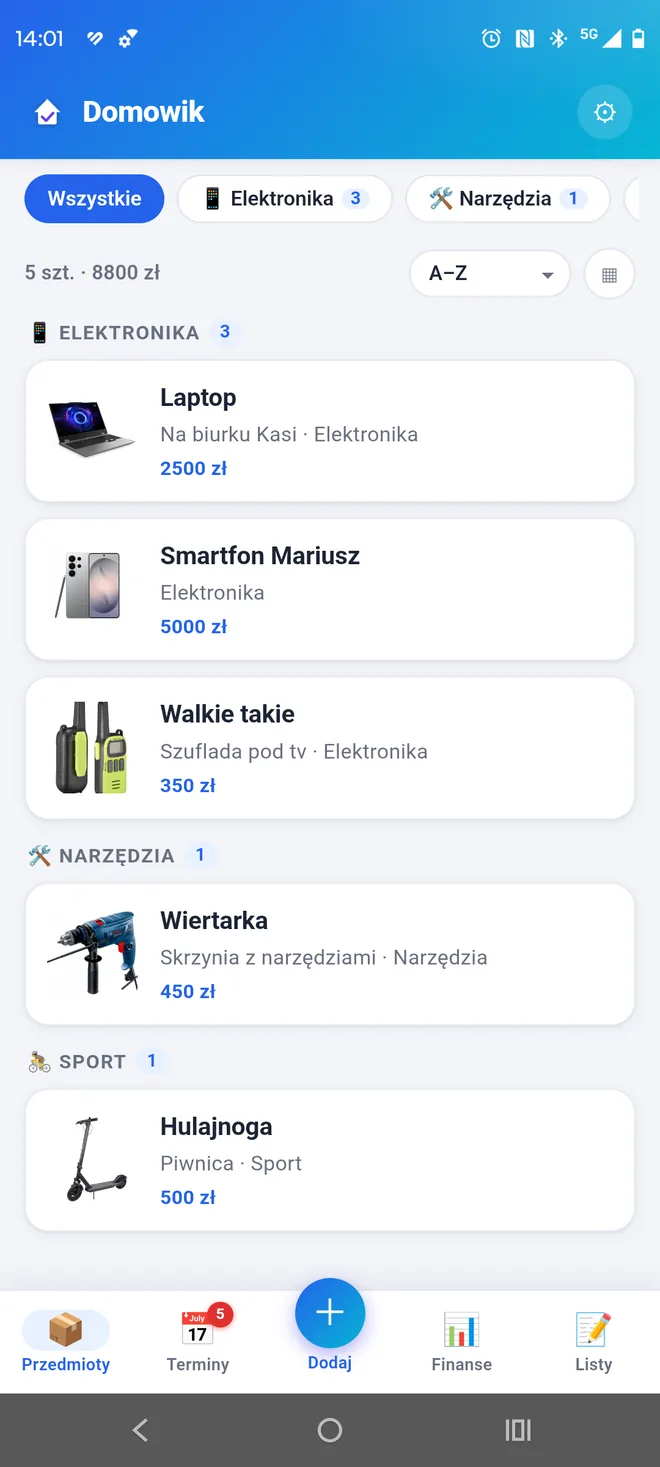
Domowik keeps this kind of list on your phone — with photos, values and purchase details. View on Google Play →
What to record for each item
The fewer fields there are, the better the odds the list actually gets made. A minimum set that already works:
- Name — specific, with make and model: "Bosch WAN28 washing machine", not "washing machine".
- Location — the room, and for smaller things the piece of furniture or shelf.
- Category — for grouping and value summaries.
- Value — purchase price or estimated replacement cost.
- Purchase date and place — the starting point for any warranty or return.
- Photo — one general shot is enough to begin with.
Worth adding when they are to hand: serial number, a note about the proof of purchase and where the original is kept, and quantity for things that come in sets.
Replacement cost or purchase price? For a claim, the more useful figure is what an equivalent would cost today. A device bought five years ago for 3,000 may cost 2,000 now — or 4,000. If you are unsure, record the purchase price together with the date; the insurer will do the rest of the maths and you keep a reference point.
How to photograph your things
A photograph is the strongest evidence that something was actually in the house, and the fastest way to fill in details later. It does not have to be attractive — it has to be legible.
Two photos per item
The first shows the whole device in its usual place, which documents the location as a bonus. The second is a close-up of the rating plate, serial number or proof of purchase. That pair covers most situations.
Practical tips
- Shoot in daylight or with the main light on — a phone in dim light loses focus on small print.
- Take rating plates from 15–20 cm away and check on screen that the digits stay readable when you zoom in.
- For sets, one general photo of the whole kit plus a separate shot of the most expensive component.
- Boxes and manuals do not need photographing, but a shot of the serial-number sticker on the packaging is often easier than reading it off the back of the appliance.
Domowik allows two photos per item on the free tier and six on Premium. In practice two is exactly what a typical device needs: the general view and the rating plate.
Categories and locations without the mess
The biggest threat to an inventory is not missing data but inconsistent naming. If the same shelf is called "TV cabinet" once, "under the television" the next time and "living room" after that, filtering stops meaning anything.
Fix the vocabulary before you start
Before entering the first item, write down the categories you will use and stick to them. A handful that work in most homes: Electronics, Appliances, Furniture, Tools, Sport and outdoors, Jewellery and watches, Documents, Seasonal.
The same goes for locations — name rooms the way you talk about them day to day, and only add detail after a dash when you need it: "Living room", "Living room — TV cabinet", "Cellar — left shelving unit".
Fewer categories is better
Eight categories you actually use are worth more than twenty you get lost in while entering things. A category should answer the question "where do I look for this on the list", not build a scientific taxonomy.
Room by room through the house
Once the most valuable things are recorded, the easiest way to continue is by room. One room per session, 15–20 minutes.
Kitchen
Large appliances (fridge, dishwasher, oven, hob, extractor), smaller ones with real value (coffee machine, food processor, microwave), pan and knife sets if they are good ones.
Living room
Television, audio equipment, games console, router, higher-value furniture, plus decorations and artwork if they have material value.
Bedrooms and study
Computers, monitors, tablets, e-readers, jewellery, watches, cameras and lenses, musical instruments.
Bathroom and utility room
Washing machine, dryer, water heater, vacuum cleaner, iron and steam station, higher-value cleaning equipment.
Cellar, garage, loft
Power tools, bicycles, sports and camping gear, tyres, car accessories, lawnmower and garden tools. This is usually the most neglected part of an inventory, and at the same time the place where a lot of expensive things are kept.
Tip: start with the room that holds the most expensive things, not the one nearest the front door. If your enthusiasm runs out after two sessions, you will still have the things that matter most on record.
An inventory built for insurance
If insurance is the main reason you are making the list, a few things are worth setting up differently.
Watch the sum insured
A total value across all items shows whether the sum insured on your policy still bears any relation to reality. Underinsurance is one of the most common reasons a payout comes in lower than expected.
Mind the sub-limits
Policies usually carry separate limits for cash, jewellery, electronics and items kept in outbuildings such as a cellar or garage. It is worth knowing how much you actually keep in each group — categories in the inventory answer that in seconds.
Keep a copy off-site
An inventory stored only on the phone that burned along with the flat will not help. Export the list and keep a copy somewhere else: in the cloud, on a drive at work, or with family. Domowik can export items to CSV and create a full JSON backup — where you keep the copy is up to you. There is more on the copying process itself in our guide to backing up app data before changing phones.
Keeping the list current
An inventory nobody updates loses its value within a year. Three habits are enough to prevent that.
- Add new equipment straight away. The best moment is the day of purchase, while the receipt is still in the bag and the box is in the hallway.
- Review it twice a year. Fifteen minutes to check the most expensive entries, remove things you have sold and update values.
- Refresh the backup after bigger changes. After buying something expensive or after a session spent filling in the list.
While you are entering a new device, it is worth setting the warranty expiry date at the same time — one action then covers two jobs. How to build that reminder system is covered in our guide to tracking warranties and important deadlines.
Record your first 15 items today
Domowik keeps photos, values and purchase details with every item — locally, with no account needed.
Get Domowik on Google Play Scan with your phone
Common mistakes
- Trying to record everything at once. The most frequent reason lists get abandoned. Fifteen of the most valuable items deliver most of the benefit for a fraction of the effort.
- Cataloguing trivia. Entering towels and mugs swells the list until the important entries disappear among the irrelevant ones.
- Inconsistent category and location names. "Appliances", "Kitchen appliances" and "Kitchen — appliances" in one list mean filtering has stopped working.
- Photos with unreadable numbers. A blurred rating plate is as useless as no photo at all. Check legibility right after taking the shot.
- No copy outside the device. The inventory is meant to help in exactly the situation where the phone may be destroyed or stolen.
- Recording an old price without the date. A figure on its own says nothing about what the device is worth today.
- Skipping the cellar and garage. They often hold equipment worth more than half the living room.
How Domowik can help
An inventory can live in a notebook, a spreadsheet or an app — any of these works if you genuinely use it. A spreadsheet handles simple lists well but copes badly with photos and reminders.
Domowik was designed for this particular job: an item has a name, location, category, value, purchase date and place, a note, photos and linked deadlines. There is a list view and a grid view, plus search, filtering and a value summary. The free version covers 20 items and 2 photos per item; Premium removes the item limit and allows up to 6 photos.
Data is stored locally on the device, no account required, and you run backups and exports yourself whenever you need them. That has one important consequence: data does not sync automatically, so a copy has to be made by hand before you change phones.
Frequently asked questions
How long does a home inventory take?
A first session covering the 15 most valuable items, photos included, usually takes 30–40 minutes. A full inventory of a typical flat, spread across rooms, comes to around 3–5 sessions of 15–20 minutes. Doing it in one go is not worth attempting.
Do I need receipts to make a claim?
Insurers accept various ways of establishing that you owned something — besides receipts, that includes photos, bank statements, warranty cards and serial numbers. The more consistent information you have, the simpler the claim. Rules differ between insurers, so it is worth checking the terms of your own policy.
Should I record things that are not insured?
Yes, if they are hard to replace or easy to forget. An inventory is useful not only for claims but also when moving, selling, and simply finding something you put away a year ago.
What if I cannot remember the purchase price?
Enter an estimated replacement cost — what a similar device would cost today — and mark in the note that it is an estimate. An approximate value is far better than an empty field.
Does every item need a photo?
No. Photos matter most for higher-value equipment, anything with a serial number, and unique items such as jewellery. For ordinary, easily available products an accurate name with the model is enough.
Where is the best place to keep the inventory?
On the device you use every day, plus a copy somewhere else — in the cloud, on a computer or on an external drive. The key rule: the copy should not sit only where the recorded belongings are.